
AWS Key Management Service (KMS)
KMS Basics:
- Can create and manage Symmetric (recommended) and Asymmetric keys.
- Keys are protected by Hardware Security Modules (HSMs).
- A KMS key can only be used to encrypt data 4KB in size.
- Anything <4KB requires a Data Encryption Key (DEKs).
- Recently made FIPS 140-3 Level 3 compliant (~2023).
Alternate Key Stores: XKS and CKS
External Key Store (XKS):
- Stored outside of AWS for regulatory requirements.
- Create KMS Keys in an AWS KMS XKS.
- All keys generated and stored in external key manager.
- When using XKS, key material never leaves HSM.
Custom Key Store (CKS):
- Can create keys in CloudHSM Custom Key Store.
- Keys created and stored in CloudHSM cluster you own and manage.
- Cryptographic operations performed solely in the CloudHSM cluster.
- Not available for Asymmetric keys.
AWS Managed Keys:
- Created, managed and used by AWS services integrated with KMS.
- Cannot manage, rotate or change key policies.
- Services use them on your behalf.
Data Encryption Keys (DEKs):
- Data Keys used to encrypt a large amount of data.
- Can use AWS KMS keys to generate, encrypt and decrypt data keys.
- AWS KMS does not store, manage or track DEKs.
- Not cryptographic operations are done by KMS with DEKs.
- Applications must use DEKs to perform cryptographic operations.
- You must use and manage data keys outside of AWS.
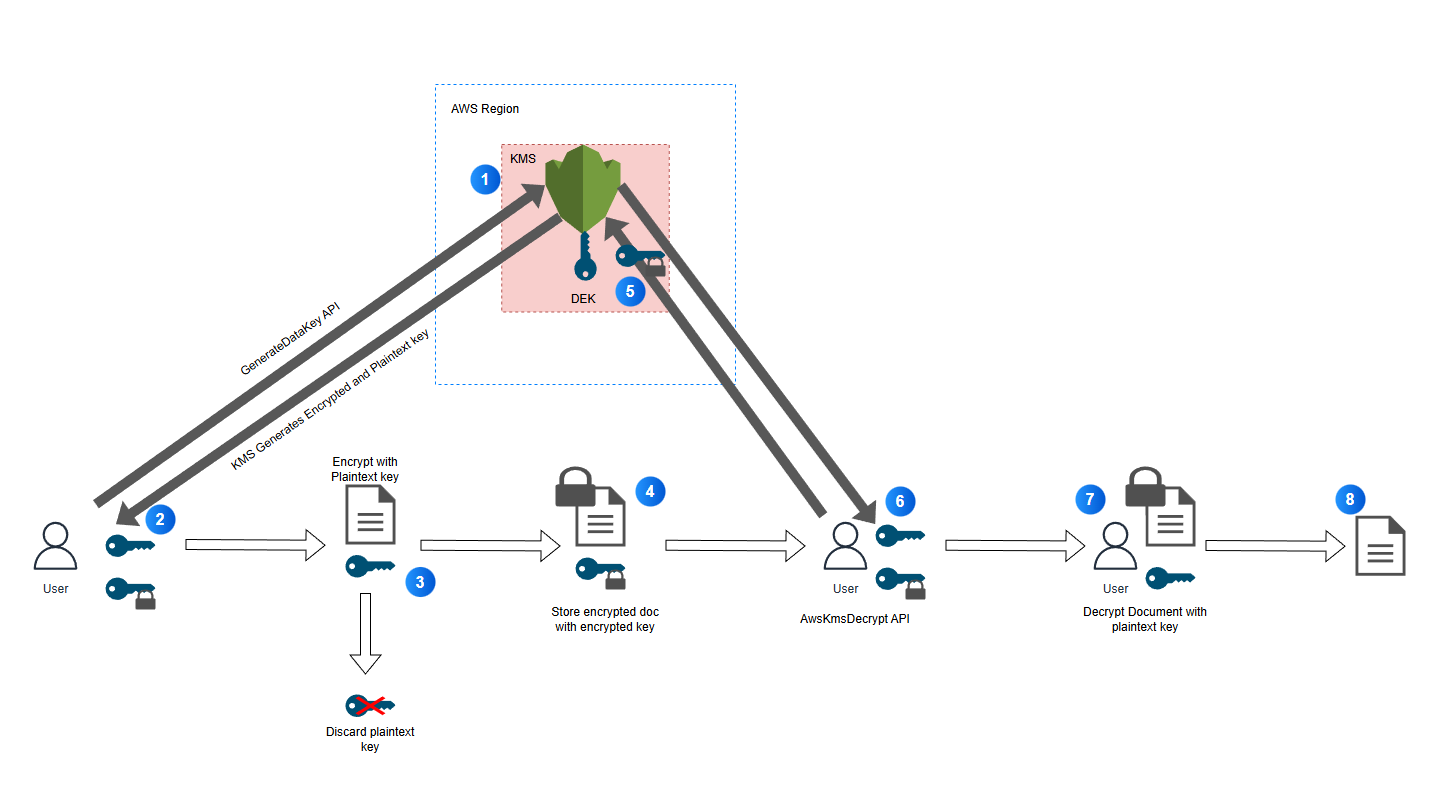
- Below shows a diagram of a user using API calls to create and use DEKs to encrypt and decrypt a document.
Key Rotation:
- Only supported for symmetric KMS Keys which originated from KMS.
- When key rotates, ID stays the same, Key Material changes.
- This means policies, name and ARN stay the same.
Automatic Rotation:
- Automatic rotation is not supported on Asymmetric keys, HMAC KMS Keys, KMS Keys in CloudHSM and KMS Keys with Imported Material.
Manual Rotation:
- Creating new KMS Key with new ID.
- Must update apps which can be disruptive.
- Should use the Alias for your apps and update the alias whcih will be less disruptive.
Summarisation Table for Key Rotation:
| Type | Can View | Can Manage | Unique? | Rotation |
| Customer Managed Keys | Yes | Yes | Yes | Optional 365 Days |
| AWS Managed Keys | Yes | No | Yes | Required 365 Days |
| AWS Owned Key | No | No | No | Varies |
KMS Key Policies:
- KMS keys have management and usage permissions.
- Multiple statements can be combined to specify separate administrative and usage permissions.
- Permissions can be specified for delegating use of key to AWS services - grants.
- Grants are useful for temporary permissions.
KMS API/CLI Commands:
- Encrypt: 'aws kms encrypt' - used to move encrypted data between regions or turn plaintext to ciphertext.
- Decrypt: 'aws kms decrypt' - Decrypt ciphertext that was encrypted using KMS.
- Re-encrypt: 'aws kms re-encrypt' - decrypt and re-encrypt inside of KMS/Used to change KMS Key or context.
- 'enable-key-rotation': Enables automatic rotation - cannot be used on a key in another account.
- 'GenerateDataKey': Generates a symmetric data key, returns a plaintext and ciphertext key.
- 'GenerateDataKeyWithoutPlaintext': Generates symmetric key, returns only the encrypted key.
- For asymmetric keys consider: 'GenerateDataKeyPair' or 'GenerateDataKeyPairWithoutPlaintext'.
Throttling and Caching in KMS:
- Two quotas to be aware of, resource and request.
- If exceeded resource limit then you will see 'LimitExceededException' error message.
- Request quotas apply to API actions such as encrypt, decrypt and re-encrypt. (Err 400).
Prevent Throttling:
- Can request service quota increase from AWS Support.
- Implement Data Key caching. (Apps can reuse data keys, or run the cryptographic operations which are slow and intrusive).
- Backoff and retry method.
KMS Memorables:
- Cryptographic erasure means removing the ability to decrypt data.
- Cryptogrpahic erasure is achieved by deleting imported key material.
- Delete imported key material using 'DeleteImportedKeyMaterial' API Call.
- 'InvalidKeyID' exception when using SSM Parameters store indicates KMS Key not enabled.
- Key Admins are fundamentally different to key users.